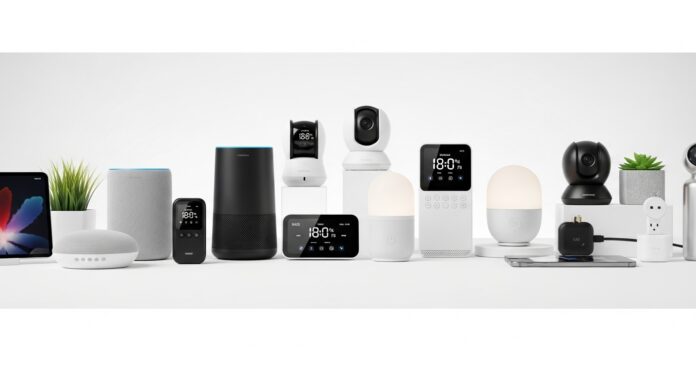
Imagine waking up to the gentle hum of your favourite coffee brewing, the shower already at the perfect temperature, and the lights gradually brightening rather than snapping on. That’s not a scene from a futuristic film — it’s what a well-chosen set of smart home devices actually does. With so many options on the market now, though, picking the right one can feel more like navigating a maze than making a simple purchase.
This guide walks through how to actually figure out what you need, what to look for while comparing options, and how to avoid ending up with a device that looked impressive in a review but doesn’t fit how you actually live.
Start With What You’re Actually Trying to Solve
The most common mistake in smart home shopping is buying a device because it’s popular rather than because it solves something specific. Before comparing products, it’s worth pinning down what you’re actually trying to achieve — better security, lower energy bills, or just less daily friction around routine tasks. Each of those points toward a different category of device, and trying to solve all three with one gadget usually means doing none of them particularly well.
Identify Your Core Needs
Security. If safety is the priority, smart security systems and cameras are the natural starting point. Devices like the Ring Video Doorbell or Google Nest Cam provide real-time monitoring, motion alerts, and remote viewing from a phone — useful both for deterring issues and for peace of mind when you’re away from home. Look specifically at video quality, storage options (local versus cloud, and whether cloud storage requires an ongoing subscription), and how alerts are delivered.
Energy efficiency. For anyone focused on reducing consumption, smart thermostats and lighting systems tend to offer the most measurable payoff. A smart thermostat like the Nest Learning Thermostat learns your schedule and adjusts temperatures automatically rather than requiring manual changes throughout the day. According to ENERGY STAR — the joint EPA and Department of Energy program — a certified smart thermostat saves the average household about 8% on heating and cooling costs, translating to roughly $50 a year for a typical home, with actual results varying by climate, insulation, and existing habits. That’s a smaller number than some marketing claims suggest, but it’s the figure with the most rigorous backing, based on independently verified field data rather than lab estimates.
Convenience. Smart speakers and hubs — Amazon Echo, Google Home, and similar devices — are usually the entry point for people building out a broader smart home, since they act as a control centre for other devices as well as handling standalone tasks like reminders, timers, and music. Their real value tends to compound as you add more connected devices, since a single voice command can then control several things at once rather than requiring a separate app for each.
Research and Compare Before You Buy
Once you know roughly what category you’re shopping in, a few factors matter more than brand recognition or star ratings alone.
Compatibility. Confirm a device actually works with what you already own before purchasing. If your home already runs on Apple HomeKit, Google Home, or Amazon Alexa, a device built for a different ecosystem can mean a clunkier setup or features that simply don’t work together. This is one of the most common sources of buyer’s remorse in smart home shopping — a genuinely good device that doesn’t talk to anything else in the house.
Ease of use. A device with a confusing setup process or an unreliable app gets used less, however good its underlying features are. Watching an actual product demonstration, rather than relying purely on spec sheets, tends to give a clearer sense of what day-to-day use actually feels like.
Cost versus long-term value. The cheapest option in a category isn’t always the best value once you factor in reliability, subscription costs (many security cameras require a subscription for cloud storage or advanced features), and how long a device tends to last before needing replacement. Sometimes spending more upfront on a well-supported device avoids a second purchase down the line.
Customer support and update history. A smart device is only as good as its software, and companies vary considerably in how long they keep older devices updated. A device that stops receiving security patches after a year or two is a real liability, not just an inconvenience — connected devices with outdated software are a genuine security risk. Checking a brand’s track record for long-term support is worth the extra few minutes before buying.
Making the Final Decision
Once you’ve narrowed things down, reviews and independent comparisons are useful for catching issues that don’t show up in a spec sheet — inconsistent connectivity, a buggy app, customer service that’s hard to reach. It’s worth weighting recent reviews more heavily than older ones, since software updates and firmware changes can meaningfully shift how a device performs over time, for better or worse.
It’s also worth being specific about what you’re checking reviews for. General star ratings are a blunt instrument; reading a handful of reviews that specifically mention your use case — apartment versus house, a particular smart home ecosystem, a specific room size for a camera or sensor — tends to be more useful than an average score built from a wide range of different setups.
Building a Smart Home Gradually
One of the more common mistakes is trying to build an entire smart home system in a single purchase. Starting with one or two devices that solve a specific, immediate problem — a single smart thermostat, one camera at the front door — lets you get a feel for a particular ecosystem before committing further. It also makes it much easier to catch compatibility or reliability issues early, rather than discovering them after investing in a dozen connected devices.
From there, expanding tends to go more smoothly when new devices are chosen specifically to work within the ecosystem you’ve already started, rather than picking whatever’s currently on sale. A security camera and a smart plug from different ecosystems might both work perfectly well individually, but the convenience of a smart home comes largely from devices working together — automations that trigger across multiple devices, a single app controlling everything, voice commands that address the whole system rather than one gadget at a time.
Other Device Categories Worth Knowing
Beyond the three core categories above, a few other types of smart devices come up often enough to be worth understanding before you shop.
Smart plugs and switches. These are usually the cheapest, lowest-commitment entry point into home automation — turning an existing lamp or appliance “smart” without replacing it. They’re a reasonable way to test whether automation genuinely fits your routine before investing in purpose-built smart devices.
Smart locks. These sit at the intersection of security and convenience, letting you unlock doors remotely, grant temporary access to guests or service providers, and check whether a door is locked without walking back to check. Battery life and a reliable backup unlocking method (a physical key or keypad code) are worth checking carefully here, given the stakes of a lock failing.
Smart sensors. Leak detectors, smoke and carbon monoxide sensors with smart alerts, and motion or door sensors often deliver outsized practical value relative to their cost — catching a slow leak before it becomes serious water damage, for instance. These are worth considering even for people who aren’t otherwise building out a full smart home.
Robot vacuums and other smart appliances. These solve a specific, recurring task rather than functioning as part of a broader automation system, which makes them a bit of an outlier category. They’re worth evaluating more on standalone performance — navigation, suction, battery life — than on ecosystem compatibility, since most people use them independently rather than as part of a coordinated automation routine.
Setting Up for Long-Term Success
A device chosen well can still underperform if it’s set up poorly, and a few habits make a real difference once you’re past the buying decision.
Secure your network first. Smart devices are only as secure as the Wi-Fi network they’re connected to. A strong, unique router password and updated router firmware matter more to overall smart home security than any single device’s individual settings.
Use a separate network for smart devices where possible. Many routers support a guest network or a dedicated IoT network, which keeps smart devices separated from computers and phones that handle more sensitive information. This is a relatively simple step that meaningfully reduces risk if any single device is compromised.
Keep firmware updated. Set devices to auto-update where that option exists, and periodically check for updates on ones that don’t update automatically. This is the single most effective ongoing habit for keeping a smart home secure over time, since most vulnerabilities are patched fairly quickly once discovered — but only if the update actually gets installed.
Review permissions periodically. As you add devices and connect them to voice assistants or automation apps, it’s easy to accumulate permissions you no longer need or remember granting. A periodic review — what has camera access, what has location data, what’s connected to what — keeps the system easier to manage and reduces unnecessary data exposure.
Common Mistakes to Avoid
Buying based on features you won’t use. It’s easy to be drawn to a device with an impressive feature list, but a security camera with advanced AI detection features is wasted if you only ever check it a handful of times a month. Match the feature set to your actual habits, not your aspirational ones.
Ignoring subscription costs. Many smart home devices are affordable upfront but carry ongoing subscription fees for full functionality — cloud video storage being the most common example. Factor the annual cost into your decision, not just the sticker price.
Overlooking privacy settings. Connected devices collect data by design, and privacy controls vary meaningfully between brands. It’s worth checking what data a device collects, how it’s used, and what controls you have over it before it’s sitting in your living room or bedroom.
Skipping the ecosystem question. Buying devices from several unrelated ecosystems without checking compatibility first is one of the more frequent regrets in smart home shopping — it often means juggling multiple apps and losing the actual convenience the technology was supposed to provide.
Assuming more devices means more value. A handful of well-chosen, well-integrated devices that solve real problems in your daily routine tend to deliver more genuine value than a large collection of gadgets that never quite get set up properly or used consistently.
Final Thoughts
Choosing the right smart home device comes down to being specific about what you’re actually trying to solve, rather than starting from what’s trending. Define your priority — security, efficiency, or convenience — check compatibility with what you already own, and weigh the real long-term cost, subscriptions included, before committing. Built up deliberately, one useful device at a time, a smart home genuinely does make daily life smoother; built up randomly, it tends to just mean more apps and more things that don’t quite work together.

